
When system C drive of your Windows 2008 Server is out of free disk space? The experienced server administrator knows the best solution is resize volumes with partition software. As Partition Magic is the first and most famous Server partitioning tool, many people try to find partition magic for Windows 2008.
Partition Magic is no longer for selling from Symantec corporation. After acquired by Symantec, Partition Magic has not been upgraded. So it is impossible to repartition under advanced Operating System, such as Windows Server 2003, 2008, etc.
Then what to do? Don't worry, there are alternatives.
Partition Assistant Server is not only a server partition resizer but also an ALL-IN-ONE Server disk management toolkit for Windows Server 2000, 2003, 2008 and Small Business Server 2003/2008/2011.
Hard disk drive, VMware, Hyper-V, hardware RAID, removable USB stick, memory cards are all supported.
It allows user to Resize, Merge, Shrink, Extend system and data partition. Create, Delete, Format, Copy, Hide, Active, Convert partition, etc.
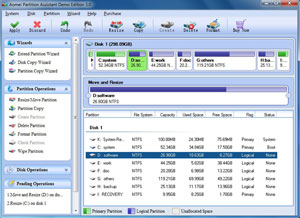
Based on the unique enhanced data protection technology and Copy Wizard built in Partition Assistant Server Edition, you don't need to worry about the data safety. It is highly recommended by many professionals and editors.
With Hot Resize feature, you can extend Windows 2008 NTFS system partition without rebooting.
With its user-friendly interface, the functions are easy to get access to, no matter whether you have experience using Partition Magic or not.
Unlimited edition allows unlimited installation within your company to save time and money.
 30-day Money Back Guarantee
  Secure Shopping
  Recommended by Millions
  7*24 Live Chat
  SSL Encrypted



Copyright © 2008-2015 Partition-Magic-Server.com ALL RIGHTS RESERVED.
Partition Magic ® is a registered trademark of Symantec Corporation.
About | Privacy Policy | EULA | Terms Of Use | Contact | Uninstall